Quick Picks
Short on time? Here are our top recommendations:
- XGIMI MoGo 3 Pro (~$400) — Best overall, Google TV with Netflix, 450 ISO lumens
- Nebula Capsule 3 Laser (~$380) — Most portable, laser with built-in battery
- Samsung The Freestyle (~$500) — Best design, Samsung Smart TV built in
- Dangbei Atom (~$600) — Best picture, 1200 ISO lumens laser
- XGIMI MoGo 2 (~$250) — Best value, solid 1080p starter
Smart projectors have eliminated the biggest headache of traditional projectors: the setup. No more fiddling with HDMI cables, plugging in a streaming stick, connecting external speakers, and manually adjusting the image until it’s straight. A smart projector connects to your WiFi, runs Google TV or its own streaming platform, auto-focuses and auto-corrects the image, and plays Netflix or YouTube directly — no extra devices needed.
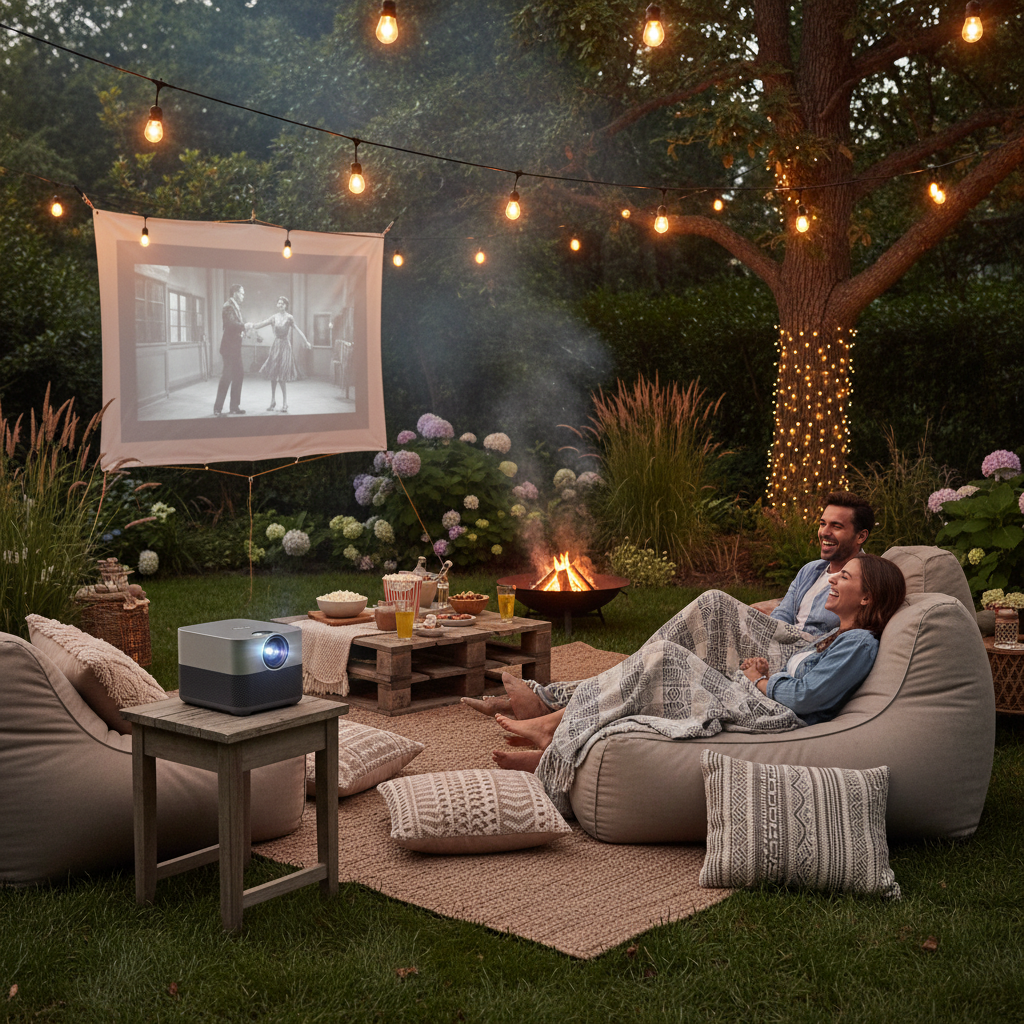
The best smart projectors in 2026 are genuinely good enough to replace a TV in certain rooms. They throw a 100-inch image that looks sharp in a dark room, have built-in speakers that sound better than most TVs, and stream every app you actually use. Take them outside on a summer night and you’ve got an instant backyard movie theater.
But there’s a wide range of quality and capability in this space. We researched the top smart projectors available on Amazon and picked five that represent the best options at different price points — from a $250 starter to a $600 brightness champion. Here’s what’s worth your money.
Our Top Picks Reviewed
XGIMI MoGo 3 Pro — Best Overall
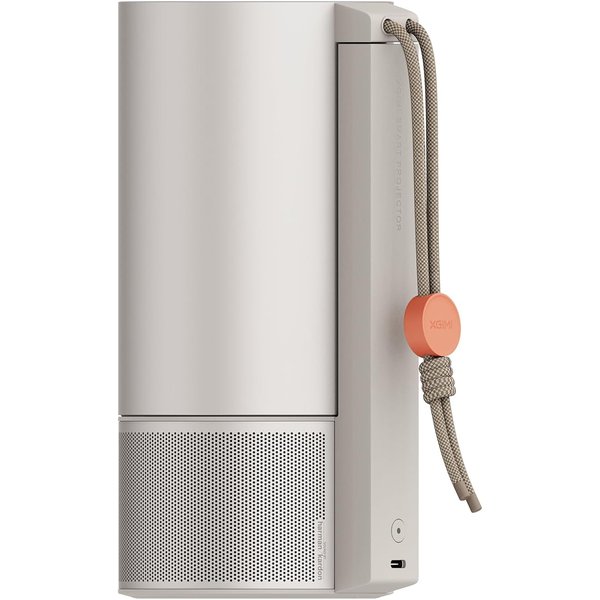
The XGIMI MoGo 3 Pro is the projector that gets everything right without breaking the bank. It runs Google TV with officially licensed Netflix — that’s important because many cheap projectors claim “Netflix support” but actually require you to cast or sideload. On the MoGo 3 Pro, you open Netflix the same way you would on a smart TV.
The image is 450 ISO lumens in full 1080p, which is bright enough for a dark room or dimly lit space. It won’t overpower daylight, but close the curtains and you get a genuinely cinematic 100-inch picture. The auto-focus and auto-keystone correction mean you can set it on a table at an angle and the projector straightens the image automatically — no manual adjustments needed.
Sound comes from two 5W Harman Kardon speakers built into the chassis, and they’re surprisingly good. Clear dialogue, decent bass for the size, and loud enough to fill a bedroom or small living room without an external speaker. The built-in adjustable stand lets you tilt the projector without needing a tripod, which is a small but genuinely useful design touch.
At 1.3 pounds, it’s small enough to toss in a backpack. XGIMI also claims it works with portable power banks, so you can go fully wireless for outdoor movie nights. With Google TV, you get access to 10,000+ apps and 800+ free channels, plus Chromecast built-in for casting from your phone.
Key Features:
- Google TV with licensed Netflix, Disney+, and 10,000+ apps
- 450 ISO lumens, native 1080p
- Two 5W Harman Kardon speakers
- Auto-focus, auto-keystone, and object avoidance
- Built-in adjustable stand
- Power bank compatible
- Chromecast built-in
Pros:
- Google TV with real Netflix — no sideloading or casting needed
- Harman Kardon speakers sound great for the size
- Auto-setup (focus, keystone, avoidance) makes placement easy
- Compact and power bank compatible for outdoor use
- Built-in stand eliminates need for a tripod
Cons:
- 450 lumens isn’t bright enough for well-lit rooms
- No built-in battery (needs power source or power bank)
- Can run warm during extended use
- Premium price for a portable projector
Nebula Capsule 3 Laser — Most Portable
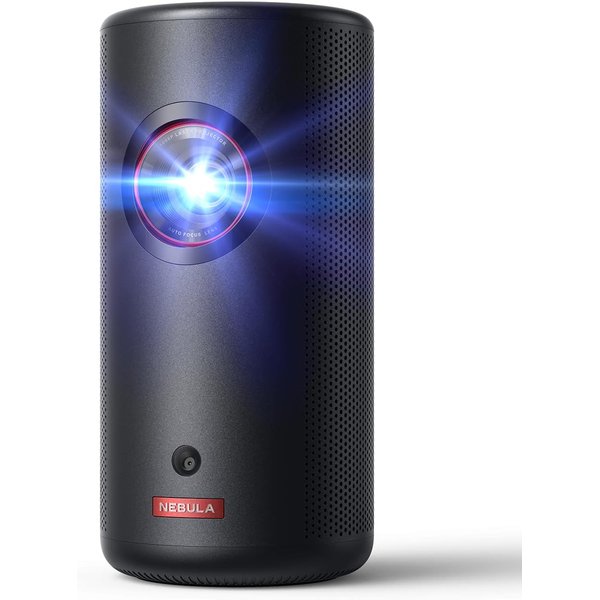
The Nebula Capsule 3 Laser is the smallest projector on this list that doesn’t feel like a compromise. It’s about the size of a tall soda can, weighs just under 2 pounds, and has a built-in battery that lasts 2.5 hours of video playback. Throw it in a bag, take it to a friend’s house, set it on a table, and you’re watching a movie — no power outlet, no cables, no setup.
The laser light source is the upgrade that makes this model worth it over the standard Capsule 3. At 300 ANSI lumens, it’s brighter than the non-laser version, and laser light sources maintain their brightness over thousands of hours where LED sources gradually dim. The 1080p image is sharp, colors are accurate, and the auto-focus gets the picture crisp within seconds of turning it on.
Anker (Nebula’s parent company) runs a clean version of Android TV on this model, with access to major streaming apps and a built-in app store. It also supports Chromecast, so you can cast from any phone or laptop. The Dolby Digital audio through the built-in 8W speaker is loud enough for a quiet room, though you’ll probably want to connect a Bluetooth speaker for outdoor use or larger spaces.
The trade-off for all this portability is brightness. 300 lumens is fine in a fully dark room, but struggles in any ambient light. And the 2.5-hour battery means you’re cutting it close on longer movies. But for casual viewing, travel, and outdoor movie nights where you value grab-and-go convenience above all else, nothing beats the Capsule 3 Laser.
Key Features:
- Laser light source, 300 ANSI lumens, 1080p
- Built-in battery (2.5 hours video playback)
- Android TV with Chromecast built-in
- Dolby Digital audio, 8W speaker
- Auto-focus
- 120-inch max screen size
- Weighs under 2 lbs
Pros:
- Truly portable — built-in battery, under 2 lbs
- Laser light source is brighter and longer-lasting than LED
- Chromecast built-in for easy casting
- Excellent build quality from Anker
- Great travel companion
Cons:
- 300 lumens needs a fully dark room
- 2.5-hour battery barely covers a long movie
- Small speaker needs Bluetooth backup for groups
- Android TV instead of Google TV (fewer native apps)
- Higher price for the brightness level
Samsung The Freestyle — Best Design
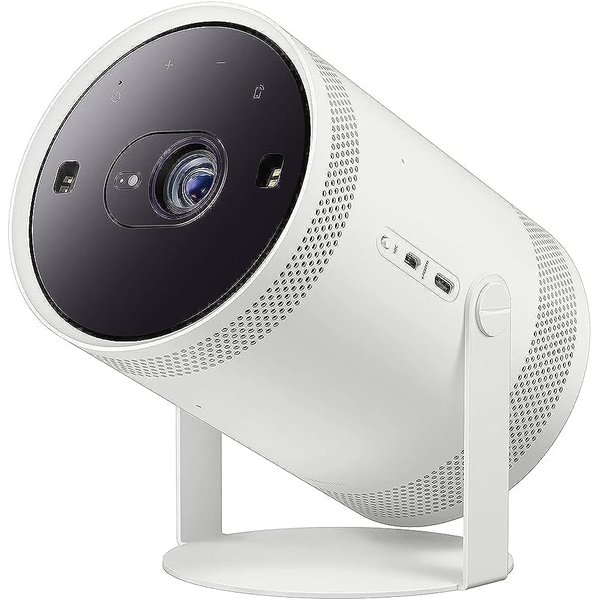
Samsung’s The Freestyle doesn’t look like any other projector, and that’s the point. The cylindrical design with a 180-degree adjustable cradle means you can point it at the ceiling from your nightstand, project onto a wall at an angle, or set it up traditionally — all without a mount or tripod. It doubles as a mood light and Bluetooth speaker when you’re not projecting.
Under the hood, it’s running Samsung’s Tizen smart TV platform — the same software from their TVs. That means native access to every major streaming service, Samsung TV Plus free channels, and a polished interface you’re probably already familiar with if you own a Samsung TV. Alexa is built in, so you can use voice commands to launch apps, control playback, and even manage other smart home devices.
The image quality is FHD 1080p with HDR support, projected at around 230 ISO lumens. The auto-focus and auto-keystone work well, and Samsung’s Smart Calibration feature uses your phone’s camera to optimize the image for the specific wall color and texture you’re projecting on — a genuinely clever feature that makes a visible difference.
The 360-degree speaker produces sound that fills a room more evenly than front-firing speakers on other projectors. It genuinely works as a standalone Bluetooth speaker for music when the projector is off.
Samsung sells a battery base separately that gives the Freestyle about 2 hours of cordless use. Without it, you’ll need an outlet. That’s the main downside — at ~$500, the battery should be included.
Key Features:
- Samsung Tizen smart TV platform
- Alexa built-in
- 180-degree adjustable cradle — project anywhere
- FHD 1080p with HDR support
- 360-degree speaker (doubles as Bluetooth speaker)
- Smart Calibration for wall color/texture
- Optional battery base for cordless use
Pros:
- Most versatile placement with 180-degree cradle
- Samsung smart TV platform is polished and app-rich
- Alexa built-in for voice control and smart home integration
- 360-degree sound is excellent for a projector
- Doubles as a Bluetooth speaker and mood light
Cons:
- 230 ISO lumens is the dimmest on this list
- Battery base sold separately at additional cost
- Premium price for the brightness level
- Tizen platform has fewer apps than Google TV
- Can’t project on dark-colored walls effectively
Dangbei Atom — Best Picture Quality
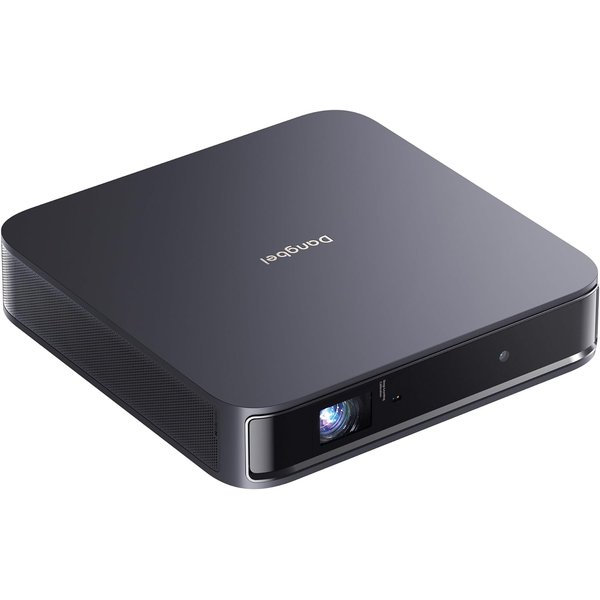
If picture quality is your top priority and you’re willing to pay for it, the Dangbei Atom delivers the best image of any portable smart projector you can buy. At 1200 ISO lumens, it’s more than double the brightness of any other projector on this list. That means you can actually use it in a room with some ambient light — curtains open, lamps on — and still see a clear, vibrant image.
The laser light source combined with DLP technology produces sharp 1080p images with accurate colors and deep contrast. It accepts 4K input (downscaled to 1080p), supports 3D content, and includes Dolby Audio for solid sound through its built-in speakers. The image quality is genuinely closer to a living room TV than what you’d expect from a portable projector.
The Dangbei Atom runs Google TV with officially licensed Netflix, giving you native access to every streaming service without sideloading or casting workarounds. The remote has a dedicated Netflix button for quick access.
The design is remarkably slim at just 1.87 inches thick and 2.8 pounds, making it easy to move between rooms or pack for travel. But there’s no built-in battery, so you’ll always need a power outlet. The ultra-slim profile makes up for this with easy portability — it’s like carrying a hardcover book.
At around $600, it’s the most expensive projector on this list. But you’re paying for brightness and picture quality that genuinely compete with budget TVs, which none of the cheaper options can claim.
Key Features:
- 1200 ISO lumens laser, DLP technology
- Native 1080p with 4K input support
- Google TV with licensed Netflix
- 3D content support
- Dolby Audio built-in speakers
- 180-inch max screen size
- Ultra-slim 1.87-inch profile (2.8 lbs)
Pros:
- Brightest portable projector on this list by a wide margin
- Usable in rooms with ambient light
- Google TV with native Netflix
- Ultra-slim design is surprisingly portable
- 3D support is a nice bonus
- Excellent color accuracy and contrast
Cons:
- Most expensive option at ~$600
- No built-in battery — needs a power outlet
- Fan noise is audible at full brightness
- DLP can produce rainbow effect for sensitive viewers
- Overkill for dark-room-only use
XGIMI MoGo 2 — Best Value
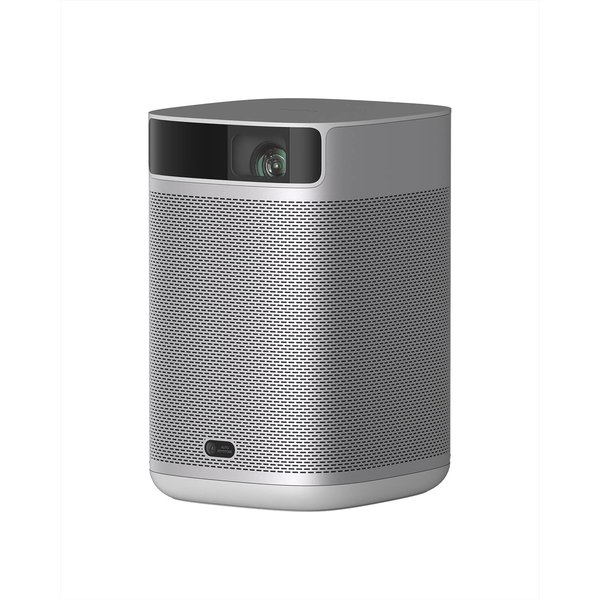
The XGIMI MoGo 2 is the smart projector to buy if you want to try the projector lifestyle without committing $400+. At around $250, it delivers the same core experience as its pricier sibling (the MoGo 3 Pro) — Android TV 11.0, 400 ISO lumens, 1080p, auto-focus, and two 8W speakers — at a price that doesn’t sting if you end up using it mostly for occasional movie nights.
The 400 ISO lumens brightness is close enough to the MoGo 3 Pro’s 450 that you won’t notice the difference in a dark room. The auto-focus, object avoidance (it won’t project on things that aren’t a flat surface), and screen adaption (it fits the image to your screen or wall automatically) all work reliably, making setup as easy as pointing and powering on.
The two 8W speakers are actually slightly larger than the MoGo 3 Pro’s 5W units, and they deliver solid audio for movie watching. They’re not going to rattle windows, but they’re more than adequate for a bedroom or small living room without connecting an external speaker.
What you give up compared to the MoGo 3 Pro: no built-in stand (you’ll need a flat surface or tripod), no Harman Kardon branding on the speakers (though the raw wattage is higher), and Android TV instead of Google TV means you’ll need to sideload Netflix rather than opening it natively. That Netflix compromise is the biggest real-world trade-off at this price point.
For outdoor movie nights, casual bedroom use, or a guest room projector, the MoGo 2 delivers exceptional value. It proves you don’t need to spend $500+ for a genuinely good smart projector experience.
Key Features:
- Android TV 11.0 with Chromecast built-in
- 400 ISO lumens, native 1080p
- Two 8W speakers
- Auto-focus, object avoidance, screen adaption
- Supports 4K input
- Compact and lightweight
Pros:
- Best price-to-performance ratio on this list
- 400 ISO lumens is bright enough for dark rooms
- 8W speakers are louder than you’d expect
- Intelligent auto-setup features work well
- Chromecast built-in for easy casting
Cons:
- Netflix requires sideloading (no native app on Android TV)
- No built-in stand — needs a surface or tripod
- No built-in battery
- Android TV 11 is older and won’t get major updates
- Slightly louder fan than newer models
Comparison Table
| Feature | XGIMI MoGo 3 Pro | Nebula Capsule 3 | Samsung Freestyle | Dangbei Atom | XGIMI MoGo 2 |
|---|---|---|---|---|---|
| Price | ~$400 | ~$380 | ~$500 | ~$600 | ~$250 |
| Brightness | 450 ISO lumens | 300 ANSI lumens | 230 ISO lumens | 1200 ISO lumens | 400 ISO lumens |
| Resolution | 1080p | 1080p | 1080p HDR | 1080p (4K in) | 1080p |
| Light Source | LED | Laser | LED | Laser | LED |
| Platform | Google TV | Android TV | Samsung Tizen | Google TV | Android TV |
| Netflix Native | Yes | No (cast) | Yes | Yes | No (sideload) |
| Built-in Battery | No | Yes (2.5 hrs) | No (accessory) | No | No |
| Speakers | 2x5W Harman Kardon | 8W | 360° | Dolby Audio | 2x8W |
| Weight | 1.3 lbs | 1.8 lbs | 1.8 lbs | 2.8 lbs | 2.4 lbs |
| Best For | Overall pick | Travel/portability | Design/smart home | Bright rooms | Budget starter |
How to Choose the Right Smart Projector
Brightness: How Many Lumens Do You Need?
Brightness matters more than any other spec. Here’s a rough guide:
- 200-300 lumens (Samsung Freestyle, Nebula Capsule 3): Needs a completely dark room. Good for bedrooms and dedicated theater spaces.
- 400-500 lumens (XGIMI MoGo 2 and 3 Pro): Works in a dimmed room with curtains closed. The sweet spot for most home use.
- 1000+ lumens (Dangbei Atom): Works with some ambient light. Can compete with a TV in certain conditions.
If you only watch at night or in a dark basement, 400 lumens is plenty. If you want to use a projector during the day or in a room with windows, invest in 1000+ lumens.
Built-in Battery vs. Wired
Only the Nebula Capsule 3 Laser has a built-in battery on this list. Samsung offers a battery base as a separate purchase. Everyone else needs a power outlet or a portable power bank.
If portability is your main use case — backyard movies, camping, travel — the Capsule 3’s built-in battery is a real advantage. For home use where you’ll set the projector up in one spot, the battery doesn’t matter as much.
Streaming Platform: Google TV vs. Android TV vs. Tizen
Google TV (XGIMI MoGo 3 Pro, Dangbei Atom) is the best option. It has the widest app library, supports native Netflix, and gets regular updates.
Android TV (XGIMI MoGo 2, Nebula Capsule 3) is the predecessor to Google TV. It works well but has fewer native apps — notably, Netflix requires sideloading or casting rather than launching directly.
Samsung Tizen (The Freestyle) is Samsung’s proprietary platform. It’s polished and has all major streaming apps, but the app library is smaller than Google TV and you’re locked into Samsung’s ecosystem.
Sound Quality
All five projectors have built-in speakers that are good enough for casual viewing. But here’s how they rank for sound:
- Samsung Freestyle — 360-degree speaker fills a room best
- XGIMI MoGo 2 — 2x8W gives it the most raw output
- XGIMI MoGo 3 Pro — Harman Kardon tuning sounds refined
- Dangbei Atom — Dolby Audio is solid for the slim profile
- Nebula Capsule 3 Laser — Good for the size but smallest speaker
For outdoor use or larger rooms, connect a smart soundbar or Bluetooth speaker regardless of which projector you choose.
FAQ
Can I use a smart projector outdoors?
Yes, and it’s one of the best use cases. Set up a portable screen or project on a light-colored wall, wait for it to get dark, and you’ve got a backyard theater. The main considerations are brightness (400+ lumens is recommended for outdoor use), power (you’ll need an outlet, extension cord, or battery/power bank), and sound (bring a Bluetooth speaker for groups).
Do smart projectors replace a TV?
For some rooms, yes. A projector in a dark bedroom or basement can deliver a 100-inch image that costs a fraction of a TV that size. But projectors need a dark room to look their best, they’re not ideal for daytime use (except the Dangbei Atom), and they generate fan noise. Most people use a smart projector as a secondary screen rather than their main TV.
How long do projector bulbs last?
Modern smart projectors use LED or laser light sources, not traditional bulbs. LED sources last 20,000-30,000 hours. Laser sources (Nebula Capsule 3, Dangbei Atom) last 20,000+ hours and maintain their brightness better over time. At 4 hours of use per day, that’s over 13 years before the light source dims significantly. You’ll replace the projector before the light source dies.
Do I need a projector screen?
Not necessarily. A light-colored, smooth wall works fine for casual viewing. But a proper projector screen makes a noticeable difference — images are brighter, colors are more accurate, and the viewing angle is better. A basic portable screen costs $30-50 on Amazon and is worth the upgrade if you use your projector regularly.
Can smart projectors connect to smart home systems?
The Samsung Freestyle has Alexa built in, so it can control smart home devices directly. Other projectors can be controlled via Chromecast (voice commands through a Google speaker) or included in scenes through their respective smart home platforms. You can set up routines like “movie time” that dim your smart lights, close your smart blinds, and turn on the projector.
Want to complete your entertainment setup? Check out our Best Smart Soundbars 2026 to pair with your projector, or browse our Best Smart Displays 2026 for smaller-screen smart viewing. And if you’re setting up a whole smart home entertainment system, our Smart Home for Beginners guide covers how to tie everything together.