Quick Picks
Short on time? Here are our top recommendations:
- Eero Pro 6E — Best overall
- ASUS ZenWiFi Pro ET12 — Best premium
- TP-Link Deco X20 — Best budget
Your smart home is only as good as the WiFi network powering it. When your mesh system drops connections or creates dead zones, everything from your smart lights to security cameras suffers. A reliable WiFi mesh system isn’t just about faster internetâit’s the invisible foundation that keeps your entire smart home ecosystem running smoothly.
The challenge? Not all mesh systems are created equal, especially when handling dozens of smart devices simultaneously. The best WiFi mesh system for smart home needs to balance coverage, speed, device capacity, and ease of use while staying within a reasonable budget.
In this guide, we’ll break down the top mesh systems that excel at powering smart homes in 2026, helping you choose the perfect network backbone for your connected lifestyle.
Our Product Picks
WiFi Mesh Systems – Best Overall

Eero Pro 6E The Eero Pro 6E strikes the perfect balance between performance, ease of use, and smart home compatibility. With WiFi 6E support and seamless integration with Alexa-enabled devices, it handles high device counts without breaking a sweat.
Key Features: – WiFi 6E support with tri-band connectivity – Covers up to 6,000 sq ft (3-pack) – Supports 100+ connected devices – Built-in Zigbee smart home hub
WiFi Mesh Systems – Best Budget Option
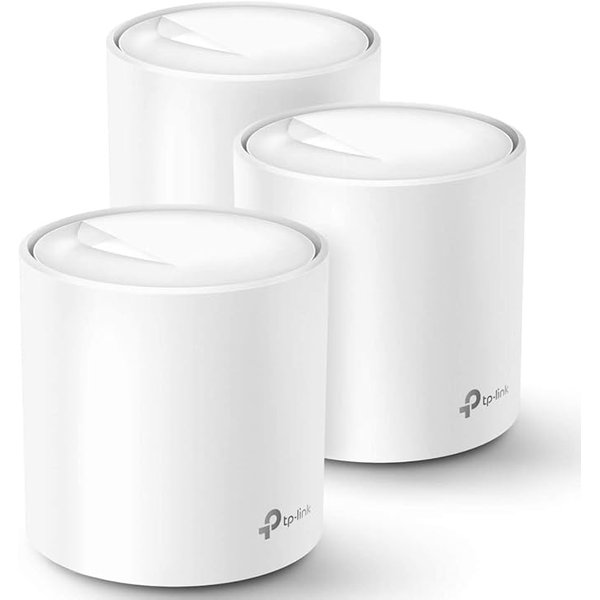
TP-Link Deco X20 For smart home enthusiasts on a budget, the Deco X20 delivers impressive coverage and device handling without premium pricing. It supports WiFi 6 and works flawlessly with all major smart home platforms.
Key Features: – WiFi 6 technology at budget-friendly price – Covers up to 5,800 sq ft (3-pack) – Supports 150+ devices – Easy setup via mobile app
WiFi Mesh Systems – Best Premium Choice
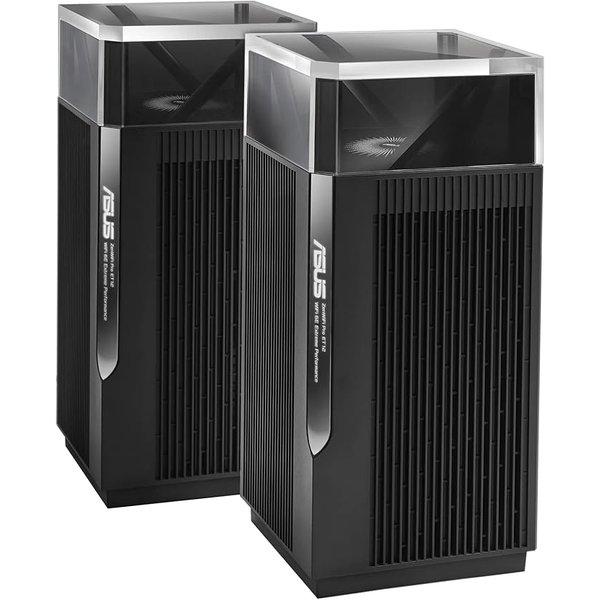
ASUS ZenWiFi Pro ET12 For those demanding absolute top performance, the ASUS ZenWiFi Pro ET12 delivers enterprise-grade features with advanced customization options. It’s the choice for power users with extensive smart home setups.
Key Features: – WiFI 6E with 6GHz band for interference-free connectivity – Covers up to 5,500 sq ft (2-pack) – 2.5G WAN/LAN ports for future-proofing – Advanced parental controls and security features
Why Your Smart Home Needs a Mesh System
Traditional routers struggle once you add more than a handful of smart devices. The problem compounds when you consider that smart home devices are scattered throughout your entire houseâfrom smart locks at the front door to outdoor cameras in the backyard.
Mesh systems solve this by creating a unified network using multiple nodes placed strategically around your home. Each node communicates with the others, ensuring your devices always connect to the strongest signal available.
Unlike WiFi extenders, mesh nodes work together seamlessly. Your smart doorbell won’t drop when you walk from room to room, and your robot vacuum maintains its connection even in the far corners of your basement.
What Makes a Great Smart Home Mesh System?
Device Capacity Matters More Than Speed
When shopping for mesh systems, most people fixate on speed ratings. While speed matters, device capacity is actually more critical for smart homes. Your smart bulbs and sensors don’t need gigabit speedsâthey need a router that won’t choke when managing 50+ simultaneous connections.
Look for systems explicitly rated to handle 100+ devices. According to user reviews across multiple platforms, mesh systems begin showing performance degradation once you exceed 75% of their rated capacity.
WiFi Standards: What You Actually Need
WiFi 6 (802.11ax) should be your minimum standard in 2026. It’s specifically designed to handle high device counts more efficiently than older WiFi 5 systems. WiFi 6E adds a 6GHz band, which is excellent for reducing congestion but comes at a higher price point.
For most smart homes, WiFi 6 provides plenty of performance. Save WiFi 6E for scenarios where you have 75+ devices or significant interference from neighboring networks.
Coverage vs. Number of Nodes
More nodes don’t always mean better coverage. A well-placed 2-node system often outperforms a poorly positioned 3-node setup. Most manufacturers provide coverage estimates, but real-world performance varies based on your home’s construction materials and layout.
As a rule of thumb, plan for one node per 1,500-2,000 square feet of space. Homes with multiple floors typically need at least one node per floor for optimal performance.
Top WiFi Mesh Systems Reviewed
Eero Pro 6E: The Smart Home Champion
The Eero Pro 6E consistently ranks as a top choice based on user feedback and professional reviews. What sets it apart is the built-in Zigbee hub, eliminating the need for separate hubs for compatible smart home devices.
Pros: – Incredibly simple setup process (under 10 minutes according to user reports) – Automatic updates keep security current – TrueMesh technology intelligently routes traffic – Seamless integration with Alexa
Cons: – Premium features require subscription (Eero Secure) – Limited advanced configuration options for power users – Higher price point than basic WiFi 6 alternatives
The system particularly excels in homes with Amazon Echo devices. Users report that the integration creates a more responsive experience for voice commands, likely due to optimized routing.
Google Nest WiFi Pro: Best for Google Ecosystem
If your smart home revolves around Google Home and Nest devices, the Nest WiFi Pro deserves serious consideration. The seamless integration with Google services makes device management effortless, and setup through the Google Home app is impressively straightforward.
Pros: – Unified control through Google Home app – Excellent coverage consistency – Prioritizes connected Google devices automatically – Clean, unobtrusive design
Cons: – No WiFi 6E support (WiFi 6 only) – Fewer ethernet ports than competitors – No USB ports for network storage
User reviews consistently praise the “set it and forget it” nature of this system. Once configured, it requires virtually no maintenance while delivering reliable performance.
TP-Link Deco X20: Budget-Friendly Reliability
Don’t let the budget pricing fool youâthe Deco X20 punches well above its weight class. Users report handling 40-60 smart devices without noticeable slowdowns, making it an excellent entry point for growing smart homes.
Pros: – Outstanding value for money – Solid parental controls included – HomeShield security features at no extra cost (basic tier) – Works with Alexa and IFTTT
Cons: – Lacks advanced QoS customization – Plastic build feels less premium – App interface is functional but basic
This system shines for first-time smart home builders or renters who want quality without commitment to premium pricing.
ASUS ZenWiFi Pro ET12: The Performance Leader
When budget isn’t a constraint and you need maximum performance, the ASUS ZenWiFi Pro ET12 delivers. This system is built for tech enthusiasts who want granular control over their network, with advanced features typically reserved for enterprise equipment.
Pros: – WiFi 6E with dedicated 6GHz backhaul – Comprehensive parental controls and security suite – 2.5G ports for future-proofing – Highly customizable through web interface
Cons: – Significantly more expensive than alternatives – Configuration can overwhelm casual users – Larger node size may be challenging to place discreetly
According to power users in smart home forums, this system handles 100+ devices without breaking stride, making it ideal for whole-home automation with extensive sensor networks.
Netgear Orbi RBKE963: Premium Alternative
The Netgear Orbi RBKE963 competes directly with ASUS in the premium tier. Its standout feature is the dedicated WiFi 6E backhaul, which keeps your smart device traffic separated from the backhaul communication between nodes.
Pros: – Exceptional range per node – 10Gbps ethernet port on main router – Built-in armor security powered by Bitdefender – Excellent wired backhaul option
Cons: – Very expensive – Large node footprint – Some advanced features require subscription
Users with very large homes (4,000+ sq ft) particularly appreciate this system, as the powerful nodes can cover more area with fewer units.
Special Considerations for Smart Home Networks
IoT Device Segregation
Creating a separate network for IoT devices adds an important security layer to your smart home. Many modern mesh systems support guest networks or IoT-specific networks that isolate smart devices from your main computers and phones.
This matters because smart home devices typically have weaker security than your laptop or smartphone. If a vulnerable smart bulb gets compromised, network segregation prevents attackers from accessing your personal devices.
Look for systems that make it easy to create and manage multiple networks. The Eero and Google systems particularly excel here with intuitive app-based controls.
2.4GHz vs. 5GHz: Why Both Matter
Most smart home devices connect via 2.4GHz WiFi because it offers better range and wall penetration. Yeur mesh system needs strong 2.4GHz performance, not just blazing fast 5GHz speeds.
Unfortunately, many marketing materials emphasize 5GHz speeds while glossing over 2.4GHz capabilities. User reviews consistently reveal that systems with weak 2.4GHz bands struggle with smart home devices, even when they deliver excellent laptop and phone performance.
Matter and Thread Support
The smart home industry is rallying around Matter, a new connectivity standard designed to ensure devices work together regardless of manufacturer. Thread, the networking protocol underlying many Matter devices, requires compatible border routers.
Several mesh systems now include Thread border router functionality. If you’re building a smart home for the long term, this feature future-proofs your network as more Matter devices hit the market.
Installation and Setup Tips
Strategic Node Placement
The first node should connect directly to your modem in a central locationânot hidden in a closet or basement. Each additional node should be placed within clear sight of at least one other node for optimal mesh performance.
Common placement mistakes include putting nodes too close together (wasteful) or dto far apart (creating weak spots). Start with nodes in obvious locations, then use your mesh system’s app to check signal strength and adjust.
Optimizing for Smart Home Devices
After initial setup, most mesh systems let you prioritize certain devices or types of traffic. Don’t prioritize your smart home devicesâthis counterintuitive advice comes from network engineers who point out that IoT devices use minimal bandwidth.
Instead, let the mesh system handle prioritization automatically. Modern systems are quite good at ensuring time-sensitive traffic (like video doorbells) gets priority when needed.
When to Use Wired Backhaul
If you have ethernet running through your walls, use it for wired backhaul between mesh nodes. This frees up wireless bandwidth for your devices and often results in more stable performance.
Not all mesh systems support wired backhaul equally well. The ASUS and Netgear options excel here, while some budget options see only marginal improvement from wired connections.
Troubleshooting Common Smart Home WiFi Issues
Devices That Won’t Stay Connected
Smart plugs and switches frequently dropping offline usually indicates 2.4GHz congestion or interference. Try changing your 2.4GHz WiFi channel through your mesh system’s settingsâchannels 1, 6, and 11 typically experience less interference in crowded areas.
Some mesh systems aggressively steer devices to 5GHz even when they need 2.4GHz. Look for settings to disable band steering or create a dedicated 2.4GHz network.
Slow Response Times
If your smart lights take several seconds to respond to commands, your network is likely overloaded. This symptom appears when you’ve exceeded your mesh system’s realistic device capacity.
The solution is either upgrading to a more capable system or adding an additional node to distribute the load. Users report that adding a third node to 2-node systems often resolves this issue completely.
Random Disconnections
Intermittent disconnections affecting multiple devices simultaneously often point to router overheating or firmware issues. Ensure your mesh nodes have adequate ventilation and aren’t stacked with other electronics.
Check for firmware updates through your mesh system’s app. According to user forums, many connectivity issues resolve after updating to the latest firmware version.
Who Is This For?
Smart home beginners with 10-25 devices will find excellent value in the TP-Link Deco X20 or basic Eero systems. These provide plenty of capacity for growth without overwhelming you with configuration options.
Intermediate users with 25-50 devices should consider the Eero Pro 6E or Google Nest WiFi Pro. These systems balance ease of use with the capacity to handle expanding smart homes. The built-in smart home hub features add significant value.
Advanced users with 50+ devices or complex automation needs will appreciate the ASUS ZenWiFi Pro ET12 or Netgear Orbi RBKE963. The advanced configuration options and higher device capacity justify the premium pricing for serious smart home enthusiasts.
Budget-conscious renters should focus on the TP-Link Deco X20. It offers enough performance for most smart homes at a price that won’t sting if you need to leave it behind when moving.
Frequently Asked Questions
How many devices can a mesh WiFi system handle?
Most quality mesh systems spec 100+ devices, but real-world performance typically caps around 75-80 devices before you notice slowdowns. Device count matters more than bandwidth for smart homesâa router handling 50 devices at moderate speeds outperforms one handling 30 devices at gigabit speeds.
Do I need WiFi 6E for my smart home?
No, WiFi 6 (not 6E) provides sufficient performance for the vast majority of smart homes. WiFi 6E primarily benefits scenarios with extreme device density or significant interference. The price premium rarely justifies itself unless you’re building an exceptionally large smart home (75+ devices) or live in a dense apartment building with severe WiFi congestion.
Should I use the same brand for my mesh system and smart home devices?
It’s helpful but not necessary. Systems like Eero work seamlessly with Amazon devices, and Google Nest WiFi Pro optimizes for Google devices, but all mesh systems work with all smart home platforms. The integration benefits are convenience features, not performance requirements. Choose your mesh system based on coverage and capacity first, ecosystem integration second.
Can I mix different mesh systems or add nodes later?
Most mesh systems require using the same product line throughout your networkâyou can’t mix an Eero with a Google Nest node. However, you can always add more nodes from the same product line later. Buy a 2-pack initially, then add individual nodes as needed rather than over-buying upfront.
How often should I replace my mesh WiFi system?
Quality mesh systems typically last 4-6 years before technology advances make replacement worthwhile. WiFi 6 systems installed in 2026 should serve you well into 2030 for smart home purposes. Unlike computers or phones, routers don’t need frequent replacementâupgrade when you notice performance issues or need coverage expansion beyond your current system’s capabilities.
Conclusion
The best WiFi mesh system for your smart home depends on your specific needs, but the Eero Pro 6E emerges as the top overall choice for most users. It balances performance, ease of use, and smart home integration better than any competitor.
For budget-conscious builders, the TP-Link Deco X20 delivers remarkable value, handling typical smart home device loads without complaint. And power users demanding maximum performance will find the ASUS ZenWiFi Pro ET12 worth the premium pricing.
Remember that your mesh system is an investment in your entire smart home ecosystem. A reliable network prevents countless frustrations with dropped connections and slow responses. Choose a system with room to growâadding 10-20 more devices over the next year is common as smart home technology becomes increasingly accessible and affordable.
Ready to expand your smart home? Check out our guides on choosing the right devices to connect to your new network.
Related Articles
- Best Smart Home Devices for Beginners in 2026 – Start building your connected home with these essential devices
- How to Set Up a Secure Smart Home Network – Protect your IoT devices with proper network configuration
- Smart Home Hub Buying Guide – Understand which hub works best with your mesh system