Quick Picks
Short on time? Here are the best home security camera systems for 2026:
- Reolink RLK8-800D4 4K PoE System (~$585) — Best overall
- ZOSI 4K PoE System with 8 Cameras (~$350) — Best value, most cameras
- Reolink RLK8-520D4 5MP PoE System (~$460) — Most proven system
- Lorex V-Series 4K NVR System with 5 Dome Cameras (~$1,000) — Best premium system
- Reolink Elite Pro Floodlight PoE (~$280) — Best add-on camera
Individual WiFi cameras are a great way to watch a front door or a living room. Covering a whole property is another matter. Six battery cameras means six batteries to charge, six cloud subscriptions, and six cameras fighting for WiFi signal at the edge of your yard. A wired security camera system fixes all three problems at once.
A system pairs several PoE (Power over Ethernet) cameras with an NVR, a network video recorder with a hard drive inside. One Ethernet cable to each camera carries both power and video, so there are no batteries and no WiFi dropouts. The NVR records every camera 24/7 to its own hard drive, so there’s no monthly fee and your footage stays in your home. You still get phone alerts and live view from anywhere through the app.
We picked complete kits across budgets, from an 8-camera starter system to a premium 4K setup, plus an add-on floodlight camera for driveways and backyards. Every listing was checked on Amazon to make sure it’s the exact system we describe. If you only need one or two cameras, our guides to outdoor smart cameras and indoor security cameras are a better fit.
PoE System vs WiFi Cameras
Choose a PoE system if: you want to cover the whole property, record continuously, avoid subscriptions, and you’re willing to run cable once. It’s the most reliable setup you can buy, and it keeps working if your internet goes down (the NVR keeps recording locally).
Choose WiFi or battery cameras if: you rent, need a camera or two, or can’t run cables. Battery cameras usually record short clips when they detect motion rather than recording around the clock, and many features require a subscription. Solar security cameras are a good middle ground for spots far from an outlet.
What to Look For in a Security Camera System
Resolution. 4K (8MP) cameras capture enough detail to read a license plate or recognize a face from further away, and they let you zoom into recordings. 5MP is still sharp and saves money and storage.
Number of cameras and channels. The camera count is what’s in the box. The channel count is how many cameras the NVR can handle. An 8-channel NVR with 4 cameras leaves room to add 4 more later.
Storage. Most kits include a 1TB or 2TB hard drive. More cameras, higher resolution, and continuous recording fill it faster. Look for a system that supports bigger drives or an external drive.
Smart detection. Person and vehicle detection filters out alerts from swaying trees, shadows, and bugs. Without it, you’ll turn notifications off within a week.
Night vision. Infrared night vision records in black and white in total darkness. Color night vision uses a spotlight or a very sensitive sensor to record in color at night.
Dome or bullet cameras. Dome cameras are compact and harder to tamper with. Bullet cameras are more visible as a deterrent and often have longer night vision range.
The Best Security Camera Systems for 2026
Reolink RLK8-800D4 4K PoE System — Best Overall
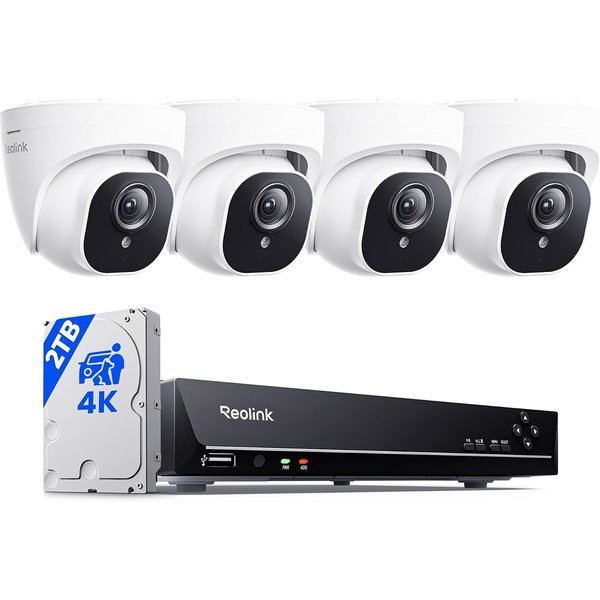
Reolink’s RLK8-800D4 is the system we’d recommend to most homeowners. You get four 4K (8MP) dome cameras and an 8-channel NVR with a 2TB hard drive preinstalled. That’s sharp video, room to add four more cameras, and enough storage for continuous recording from day one. With over 1,000 reviews averaging 4.3 stars, it’s a proven system.
Each camera connects with a single Ethernet cable that can run up to 330 feet, carrying both power and video. Setup is genuinely plug and play: connect the cameras to the NVR, connect the NVR to your router, and finish in the free Reolink app. Person, vehicle, and animal detection separates real activity from shadows and leaves, and your alerts can be set to only the types you care about.
The NVR records 24/7, and you can add an external drive up to 8TB for backup, for up to 16TB total. Reolink’s app is one of the easiest to use, with no subscription required for any feature, and the NVR works with any Reolink PoE camera, so you can expand later with floodlight, zoom, or doorbell cameras.
Pros:
- Four 4K cameras with an 8-channel NVR
- 2TB hard drive, expandable to 16TB total
- Person, vehicle, and animal detection
- Plug-and-play PoE with 330 ft cable runs
- No subscription; easy Reolink app
Cons:
- Running Ethernet cable takes time
- 4K fills storage faster than 5MP
- Dome cameras have shorter night range than bullets
ZOSI 4K PoE System with 8 Cameras — Best Value, Most Cameras
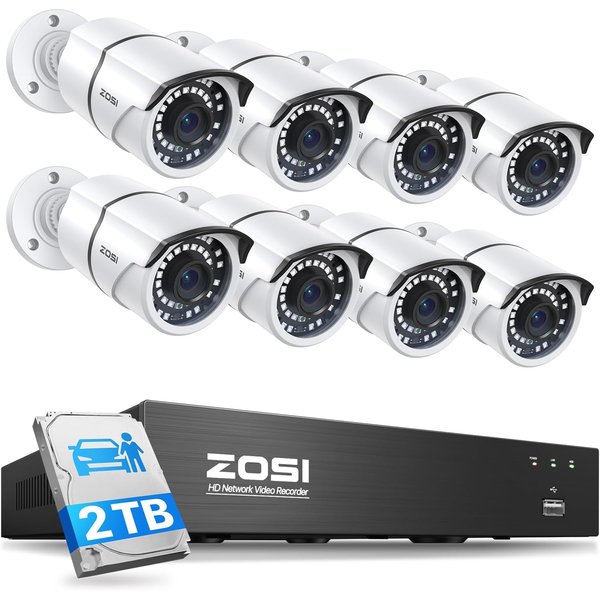
If you want to cover every side of your property without spending a fortune, ZOSI’s system gives you eight cameras for less than most four-camera kits. The cameras are 5MP metal bullet cameras built from aluminum and rated IP66, and the 8-channel 4K NVR comes with a 2TB hard drive preinstalled for 24/7 recording with no monthly fees.
Night vision reaches up to 120 feet, the longest in this guide, which is valuable for long driveways, backyards, and fence lines. AI person and vehicle detection filters out pets, leaves, and shadows before sending push alerts. You can watch from the ZOSI Smart App on iOS and Android or from a PC client, back up clips to a USB drive, and set up multiple users with different permissions.
The NVR can grow to 16 channels by adding a PoE switch. The trade-off for the price: ZOSI’s app is less polished than Reolink’s, and these are 5MP cameras on a 4K-capable recorder. If you later want 4K, you can add ZOSI 8MP cameras.
Pros:
- Eight cameras at a low price
- Metal IP66 bullet cameras
- 120 ft night vision
- 2TB hard drive, no fees
- Expandable to 16 channels
Cons:
- 5MP cameras, not 4K
- App is less polished than Reolink’s
- Bullet cameras are easier to reach and tamper with
Reolink RLK8-520D4 5MP PoE System — Most Proven System
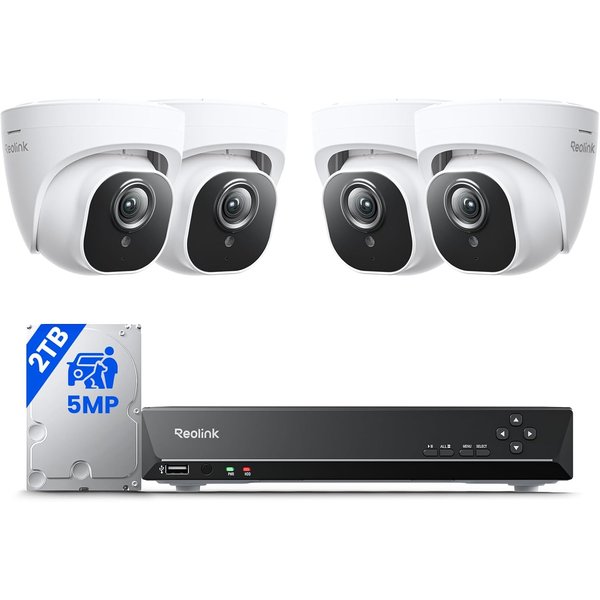
With nearly 2,800 reviews averaging 4.4 stars, the RLK8-520D4 is one of the best-reviewed security camera systems on Amazon. It’s the 5MP version of our top pick: four 5MP dome cameras, an 8-channel NVR, and a 2TB hard drive, for noticeably less money.
5MP is still sharp enough to identify people and read details at typical yard distances, and it uses less storage than 4K, so your 2TB drive holds about ten days of continuous recording before it starts overwriting the oldest footage. Infrared night vision reaches up to 100 feet. Person, animal, and vehicle detection keeps alerts relevant, and each camera has a built-in microphone, so recordings include sound.
You can add an external hard drive up to 8TB through the NVR’s eSATA port, and playback works remotely through the free Reolink app. If you don’t need 4K, this is the best value from Reolink.
Pros:
- Huge review base and a long track record
- Four 5MP cameras with an 8-channel NVR
- About 10 days of 24/7 recording on 2TB
- 100 ft night vision and audio recording
- Free Reolink app, no subscription
Cons:
- 5MP, not 4K
- Detection may need a firmware update out of the box
- External drive costs extra
Lorex V-Series 4K NVR System with 5 Dome Cameras — Best Premium System
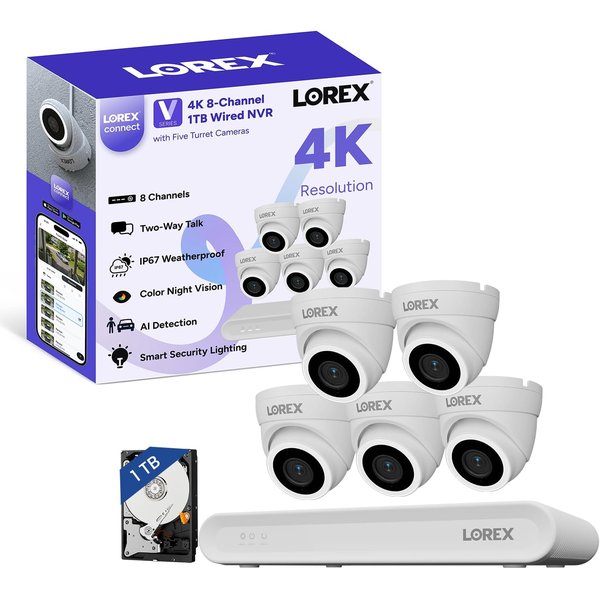
Lorex is one of the biggest names in home security systems, and the new V-Series with the Lorex Connect app is its latest generation. This kit includes five 4K (8MP) V3 dome cameras and an 8-channel NVR with 1TB of storage, expandable up to 10TB.
The cameras do more than record. Each one has bright motion-activated white LED lights and a remotely triggered siren to scare off intruders, plus a microphone and speaker for two-way audio, so you can tell a delivery driver where to leave a package. Color night vision records in color after dark, and a wide 126-degree field of view covers more area per camera.
Smart Search is Lorex’s standout feature: instead of scrubbing through hours of video, you can filter recordings by motion type, color, and more to find a specific event fast. AI detection of people and vehicles keeps notifications focused. It’s the priciest system here, and the 1TB drive is small for five 4K cameras, so plan on upgrading the drive if you want weeks of continuous recording.
Pros:
- Five 4K cameras with 126° view
- Deterrence lights, siren, and two-way audio
- Color night vision
- Smart Search for finding footage fast
- Expandable to 10TB
Cons:
- Most expensive system here
- 1TB drive is small for five 4K cameras
- New V-Series has few reviews so far
Reolink Elite Pro Floodlight PoE — Best Add-On Camera
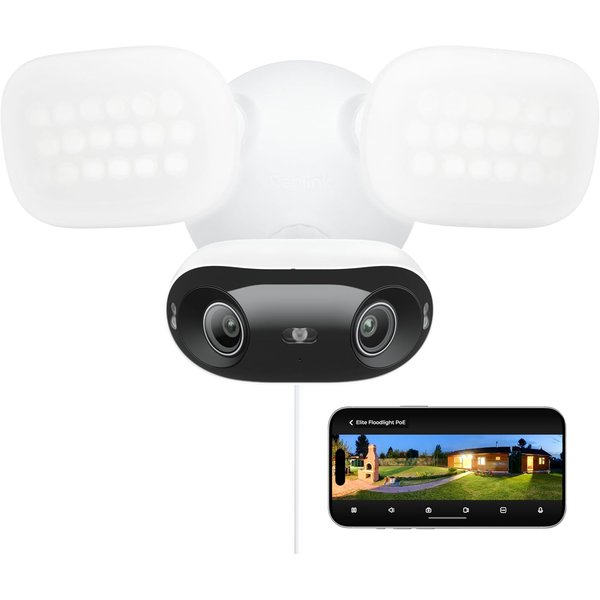
Once you have a system, the best upgrade is a floodlight camera over the driveway, garage, or back door. Reolink’s Elite Pro Floodlight PoE combines two 8MP lenses into a seamless 16MP, 180-degree panoramic view, so a single camera covers an entire driveway or backyard with no blind spots.
Its 2,800-lumen floodlight switches on when it detects a person, vehicle, or animal, which both scares off intruders and lets the camera record in full color at night. It can also sound a 105 dB siren or play a custom voice message, and two-way talk lets you speak to whoever is there.
It’s a PoE camera, so it runs on the same single Ethernet cable as the rest of your system and records 24/7 to a Reolink NVR, a microSD card (up to 512GB, not included), FTP, or a NAS. One note: to view the full 16MP image, your Reolink NVR needs recent hardware, so check the compatibility list on the listing before buying. It’s a PoE-only camera, with no WiFi connection.
Pros:
- 16MP dual-lens 180° panorama
- 2,800-lumen floodlight with color night vision
- 105 dB siren and two-way talk
- Records to NVR, microSD, FTP, or NAS
- No subscription
Cons:
- Full 16MP needs a recent Reolink NVR
- PoE only, no WiFi
- microSD card not included
Security Camera System Comparison
| System | Best For | Price | Cameras | Resolution | Storage | Night Vision |
|---|---|---|---|---|---|---|
| Reolink RLK8-800D4 | Overall | ~$585 | 4 dome | 4K (8MP) | 2TB, up to 16TB | Infrared |
| ZOSI 4K PoE System | Value, most cameras | ~$350 | 8 bullet | 5MP | 2TB | Infrared, 120 ft |
| Reolink RLK8-520D4 | Most proven | ~$460 | 4 dome | 5MP | 2TB + 8TB external | Infrared, 100 ft |
| Lorex V-Series 5-Dome | Premium | ~$1,000 | 5 dome | 4K (8MP) | 1TB, up to 10TB | Color |
| Reolink Elite Pro Floodlight | Add-on | ~$280 | 1 floodlight | 16MP 180° | NVR or microSD | Color + infrared |
How to Plan and Install a PoE Camera System
Map your coverage first. Walk your property and mark the spots that matter: front door, driveway, back door, side gates, and any ground-floor windows out of view. Most homes need four to six cameras.
Mount cameras high, but not too high. About 8 to 10 feet up is ideal: high enough to be hard to reach, low enough to capture faces rather than the tops of heads. Under the eaves protects cameras from rain and glare.
Plan your cable runs. The usual route is through the attic, then down through the soffit to each camera. Each cable can run up to about 330 feet. Pre-made cables come with most kits; buy longer ones if needed.
Put the NVR somewhere safe. A closet or basement near your router is ideal. If an intruder can grab the NVR, they can take the recordings, so don’t leave it in plain view.
Connect it to your network. Plug the NVR into your router with an Ethernet cable for app access. Remote viewing depends on your internet upload speed, so if feeds stutter away from home, view in standard quality instead of 4K.
Add a doorbell camera. A system covers the property, but a video doorbell with no subscription is still the best way to see who’s at the front door and talk to them.
How to Choose
Want the best all-around system? The Reolink RLK8-800D4.
Want the most cameras for your money? The ZOSI 8-camera system.
Want proven reliability and good value? The Reolink RLK8-520D4.
Want deterrence features and premium 4K? The Lorex V-Series.
Already have a Reolink NVR? Add the Elite Pro Floodlight over your driveway.
Still deciding between brands of standalone cameras? Our Ring vs Arlo vs Wyze comparison covers the subscription-based options, and our DIY smart home security guide walks through building a complete setup with sensors and alarms.
Frequently Asked Questions
Do PoE security camera systems need the internet?
No. The NVR records locally to its hard drive, so recording continues even if your internet goes down. You only need internet to view cameras or receive alerts on your phone when you’re away from home.
Do these systems require a monthly fee?
No. Every system in this guide records to a local hard drive at no cost, and the apps are free. That’s the biggest advantage over most WiFi cameras, where features like video history often require a subscription.
How long will the hard drive store footage?
It depends on the number of cameras, resolution, and whether you record 24/7 or only on motion. Reolink estimates about 10 days of continuous recording for four 5MP cameras on 2TB. 4K cameras roughly halve that. Recording only on motion stretches it to weeks.
Can I install a PoE camera system myself?
Yes, if you’re comfortable drilling holes and running cable through an attic or crawl space. The cameras and NVR are plug and play. The cable routing is the hard part. Many homeowners install it over a weekend, or you can hire a low-voltage installer for the wiring.
Can I mix camera brands on one NVR?
Sometimes, but it’s not worth the hassle. NVRs work best with cameras from the same brand, and smart detection features often only work with matching cameras. Stick with one brand when you expand.
The Bottom Line
For most homes, the Reolink RLK8-800D4 is the best security camera system: four 4K cameras, a 2TB NVR, easy setup, and no fees. The ZOSI 8-camera system covers the most ground for the money, the Reolink RLK8-520D4 is the most proven, and the Lorex V-Series adds deterrence lights, sirens, and two-way audio for a premium setup. Finish it off with the Reolink Elite Pro Floodlight over your driveway.